Showing posts with label beginning of the year. Show all posts

Monday, September 1, 2014

2014 ISN Setup

This year, I have completely changed how my students are doing interactive notebooks. 

Each student has 4 1-subject notebooks. The first will be used all semester, and the other 3 will be used for each of the 3 grading periods. The notebook for each grading period will be used for homework and notes, and the notebook that will be used all semester has 5 sections for Daily Quizzes, Formulas & Reference, Vocabulary, Review Questions, and Warmups. 

Here's the 1st 6 weeks Notes ISN setup so far:

  • Title Page
  • Math Notebook Rules
  • Unit 1 Table of Contents Page
  • Unit 1 Notes & Homework


We're using the unit TOC from Math=Love found here. Beside it is their homework log and Daily Quiz scores, which will be signed and collected at the end of each unit. 

For the Reference ISN, the first 4 pages look like this:
They fill in a daily I can sentence, and the page number to match. Then at the end of class, they fill in their Daily Quiz score to the right (It's my new modified SBG system - more info to come soon). 

The rest of their notebooks is divided up into 4 sections as mentioned above. Each section has a tab, and a purple page header as shown. We'll be using them throughout the semester for general reference and warmups. 

I really like separating these sections from the notes and homework by putting it all in a separate notebook. While some students took a few days to catch onto the routine, by Friday this system was working like a charm. It also lets me grade their warmups while still allowing them to bring their notes home. 


Sunday, August 31, 2014

A Quick Update & Summer PD Links

Well hi!
It's been a long summer, but quite a lot has happened in the meantime. 
Here's a run-down on the personal stuff that's been going on:

  • I spent most of the summer working on creating PD sessions. (Links to follow below)
  • I also worked for my county on a technology team and a curriculum team. 
  • Every other spare moment was spent quilting. *Sigh of bliss*
  • My husband and I spent time converting the guest room into a sewing studio.
  • I got a new job (EEEP!) on weekends teaching quilting classes. (I'm Sew excited! HEHE)
  • 2 weeks into having a sewing studio, I found out my sister would be moving in with us. She got a job in NC in the same county as me teaching 5th grade, so she moved up from Florida on a Friday just in time for the first workday the following Monday!
  • And of course there has been plenty of room decorating and resource finding over the summer. 
Whew! I've had students for ONE FULL WEEK now, and I (almost) forgot how FUN getting new students is. I love it. 

Ok. So let's cover a couple of quick links I've promised first. 
Here are the links to Livebinders I used to present at PD sessions over the summer:
While we're busy linking up to resources, have you found me on Pinterest? Most of my brainstorming and resource collecting happens there. Follow me to see and share what I find. I also post all of my interactive notebook through Evernote each year. Here's the link for my Math 2 notebook this year. 

This year, I was also fortunate enough to begin participation in a technology team, which means I get 10 iPads just for my room this year! I'm so excited to start using them with my students. 


Monday, June 16, 2014

ISN Setup for next year

I've been sitting in PD all day now - and as a natural result, I've been thinking about what to do differently for next year. The PD is for a technology team that I applied to, and I'll be getting 10 iPads for my students to use for participating.

A couple things I know about what I want for next year:

  • Increased use of centers, stations, and collaborative activities
  • Continued use of the interactive notebooks
  • Increase student accountability for the standards-based assessments (retesting requirements)
  • Better spiraling of review topics, especially with warmup questions
I think I'm going to switch my ISNs to be 5 subjects. For the past few years, I've used 1-subject notebooks (1 per grading period). This past semester, I also had the students count out the last 15 pages to use as a warmup section - which I LOVED. No more answering "what page does the warm-up go on?" when I forget to write it on the board. (Or, let's be honest. I still answer that question a few times even when the answer is written on the board.)

For the fall, I'm finally going to switch to a 5-subject notebook. We'll use 1 subject for each of the 3 grading periods. The other 2 subjects will be for warmups and grade tracking/standards based assessments/EOC review.  

I'm looking for a good way to track homework as well - at this point, unless one of you send me an awesome idea, I'll have a modified reading log taped to the back cover that will show their homework grades for the entire semester. My goal is for them to be able to see their homework grades right beside their unit test grades (in the hopes that they will realize how much completed homework helps their grades). 

Break's over - let me know if you have any great ISN ideas for me. I'll post more over the next 2 weeks as I hear great ways to integrate technology when I get through all of these PD sessions. 


Tuesday, December 31, 2013

Pre-Algebra Topics ISN Pages

 Ok, here are some of the pre-algebra pages I used for both my Foundations and Algebra 1 class. I'm sure most of the ideas came from other people, so don't think I thought these up! I'll provide links to the originals if I can find them. :)
Intro to graphing: I love that this says "quadrant" in the order of the quadrants. Inside, a graph with the axes, origin, and several points labeled.

Integers: we used manipulatives for DAYS. We played this amazing game of dots, and we made more human number lines out of students holding index cards than I care to count. The vocab frayer models are these from Math=Love. I keep about 100 copies of her frayer page on hand at all times. 

This foldable just had examples on the inside with drawings of the manipulatives that we used as we worked.
Below, a great example of how much homework I usually give - and they copy it down, rather than me copying and wasting paper. 

On to fractions! Here is a great foldable that lets them play around with fractions of the same value.
The bottom part of the page was a trimmed worksheet folded in half. It will take them a while to color, but it's worth it for the worksheets on that page - great questions!

(UPDATE: the website linked above is no longer active. I've recreated the foldable here. To assemble, you cut out the center 4 squares without cutting through the outside squares. Then fold the middle line & middle squares on each side like a mountain and pull the four corner squares into the center to form a base. The middle squares end up vertical until they're flattened, as shown.)


This conversion page I came up with after seeing this picture of an FDP triangle. 

We also of course worked out more examples in 4mulaFun's FDP foldable:

Their FDP homework:
Create an FDP chart, and I filled in one part per row. Their homework was to fill in the matching 2 parts for each row, showing work beneath the chart.
Did I mention this unit was completely calculator inactive? Love it!

Operations with fractions and decimals:

Fractions on the left, decimals on the right

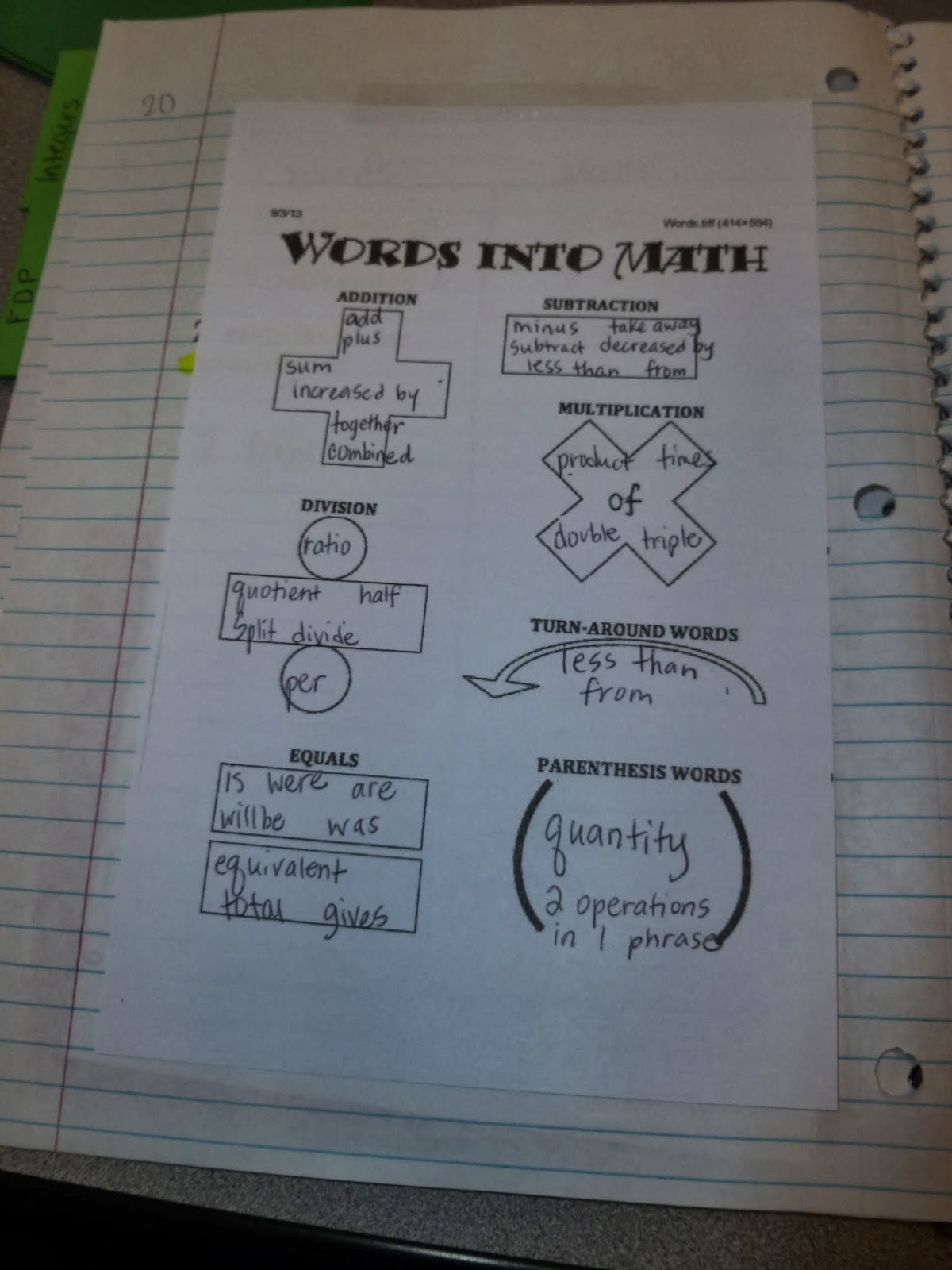
Words into math: I also wrote these on index cards for each group and had them physically sort these before we wrote them into the page.

Order of operations - I'm sure this foldable has been done hundreds of times - not sure who came up with the idea, but it's great!


Our order of operations examples (upside down pyramids) - in each row, we highlighted the new number that was created from the previous step. 

Ok - CLT. Love me some CLT. 

Here's the original for this pyramid, and here's a link to the smaller ones of the same type. 


This activity is just a typed up expression, which they cut and sort into like terms, then combine the like terms for each group. We do a gigantic class version of this as well with index cards. 

Ok, and now finally to solving one and two step equations. We start with manipulatives. I place a strip of washi tape down every desk, we cut out algebra tiles, and do examples over and over and over. 


Then we do some equations crossword puzzles - just 2-steps with blank spaces where the step needs to be. 
 Then some cut and paste work - this helps with students that don't know where to start. If they have options to choose from, they are more willing to try. 

 Want more resources from these units?
Check out this amazing county resource site!! 

Wednesday, September 11, 2013

Back into the swing of things

Today's really the first day that I've felt really back into the rhythm of school. Which is really ridiculous, since today was an awkward schedule (assembly day) and nothing seemed to go right, but maybe that's what made it seem normal. I wanted to post some of my pictures of my new room, just so you can see what I've been up to. 


This is what I arrived to the first workday - empty space and lots of boxes. I'm math department chair this year, so I got the privilege of unpacking all the math supplies for our brand new school. I also had to engrave 120 calculators - which took FOREVER. 

 Ok - this is the view from the door, and this is pretty close to what it looks like today, although I've since added scrapbook paper onto the cabinet for our "Bragging Rights" wall. 

I LOVE LOVE LOVE my graphing wall! I'll post an in-depth tutorial on how I made this, but I love it and it's great to be able to reference this during lessons, and I can't wait to use it for centers this year!

Envelopes for my three classes Mastery Skill Levels - see my previous post here. 
Each class has different topics, and I'll post the new lists, as well as templates for the envelopes (yes I made them myself) and the number labels. 

Back corner - bins from the dollar store that hold game supplies (dice, player markers, etc), erasers for the dry erase sleeves, and index cards. 

So now I just wanna brag - we got CHARGING calculators!!!! No more batteries!!!

Did I mention the color screens and the app for mixed number operations?!?!
Even my math-hater students have been geeking out over these calculators! 

Back wall, where I post grades, and the bins where I sort their ISN page materials and student files.

Laminated color cardstock taped together = dry erase table of contents for each subject!

Each class has 2 bins. One has files labeled 1-100 for their ISN page materials. Since I do a new ISN each 6 weeks, we don't get past 100 pages very often. The other bin is for their student files, where their tests and quizzes and SBG materials are kept.

Dry erase markers, highlighters, markers, and pens all sorted by color. 
This is also where I keep the bins for their ISN supplies (stacked at the end of the day). Each group gets 1 purple bin and 1 silver bin, which stack inside one another. The purple one holds scissors/gluesticks/etc for each group member, and they use the silver one for trash, then empty it at the end of class. 

This is my system for papers that they turn in - each bin has 3 folders, one for each subject area.

Absent kid system - they get a small paper out of their class's envelope that states what pages they missed and if there's anything outside of the notebook to make up. 


Phone prison - this is just the bottom half of a show organizer that I cut up, then covered the raw edges with black tape. 


For open house, this was on the board as the parents walked in - all I did was write supplies on post-its, and replenish as it grew low (I had some generous parents this year!)

Primary Board - this has since changed to a vertical setup, since it gave me more room to write the warmup. 
I give 3 warm-up questions per day, and the students respond on a weekly page that I collect as a quiz grade at the end of the week. This is also where I check their homework and give them a stamp on their punch pass. The warm-up sheet is available here. 
The labels on the board are also available for free in black and white, but they're easy to edit in word to be colorful. 


Let me know what you think!!